Windows Utility · v1.0.0
Split Loaf
Lock your keyboard to one window. Leave your mouse free for everything else.
Split Loaf reroutes your keyboard input straight to a chosen window, so you can type into one app while your mouse stays free to browse, click and work in another, without ever switching focus.
Download for Windows Get it on Microsoft Store
Free · Open source · GPL-3.0

Four keys, that's it
How it works.
No setup screens to click through. Split Loaf sits in your system tray and does its job with three function keys.
Select
Pick the window under your cursor as the target.
Lock
Send every keystroke to that window from anywhere.
Away
Move and click your mouse anywhere without losing focus.
Unlock
Release the lock and return to normal input.
Under the hood, Split Loaf uses a low-level keyboard hook to intercept and redirect input, sending it straight to the target window while preserving modifier keys like Shift, Ctrl and Alt.
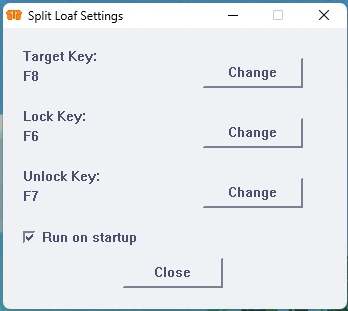
Built to stay out of your way
| Direct Input Injection | Keys go straight to the target window, automatically. |
| Custom Keybinds | Reassign the default function keys to anything you like. |
| System Tray Integration | A live tooltip shows your current target and lock state. |
| Persistent Settings | Startup and keybind settings survive restarts and updates. |
Where things stand
Version 1.0.0 is a stable, full release.
A few known limitations are worth knowing about before you install:
- Non-standard input, such as Unicode or multi-character sequences, may not be fully supported.
- Split Loaf is currently Windows-only; cross-platform support is still in development.
- Some applications may behave unexpectedly depending on how they handle low-level keyboard messages.
What's next
On the roadmap.
Full Unicode & symbol support
Optional visual lock indicator
Cross-platform support (Linux & more)
Windows notifications for lock/unlock
Get Split Loaf
Free, open source, and just a download away.
Grab the Windows executable straight from GitHub, or install it through the Microsoft Store.
Download from GitHub Microsoft Store
Windows · GPL-3.0 · Questions or bug reports: [email protected]