
Overview
Split Loaf is a lightweight Windows utility that fundamentally changes how you interact with your keyboard and mouse. It allows you to lock keyboard input to a specific window, regardless of which window currently has focus. Once locked, every keystroke is rerouted directly to the chosen target window.
This enables workflows that Windows does not natively support: typing into an IDE while browsing documentation on another monitor, interacting with reference material without ever stealing focus, or operating applications independently of mouse position.
Version 1.0.0 marks the first full and stable Windows release. The application now ships as a polished executable with system tray integration, configurable keybinds, and persistent settings stored safely in the Windows Registry.
Why Split Loaf Exists
Modern operating systems tightly couple mouse focus and keyboard input. That assumption breaks down for advanced workflows, multi-monitor setups, accessibility needs, and one-handed or efficiency-focused users.
Split Loaf deliberately breaks that coupling.
The goal is simple: your keyboard should go where you decide, not where Windows guesses.
Core Features
Target Any Window
Press a keybind to select the window currently under your cursor.
Keyboard Locking
Once locked, all keyboard input is redirected to the chosen window, regardless of focus.
Unlock Instantly
Restore normal system behaviour at any time with a single keypress.
Low-Level Input Injection
Uses a Windows low-level keyboard hook to intercept and reroute input cleanly.
Modifier Key Support
Shift, Ctrl, Alt and other modifiers behave correctly while locked.
Customisable Keybinds
Fully rebind targeting, locking, and unlocking keys to match your workflow.
System Tray Integration
Live tooltip indicators show idle, targeted, and locked states at a glance.
Persistent Configuration
Settings are stored in the Windows Registry and survive restarts and updates.
How It Works (User Guide)
Default Keybinds
| Action | Key |
|---|---|
| Target window | F8 |
| Lock keyboard | F6 |
| Unlock keyboard | F7 |
Basic Workflow
Start Split Loaf
The application runs silently in the system tray.
Target a Window
Hover your mouse over the desired window and press F8.
Lock the Keyboard
Press F6 to lock all keyboard input to that window.
Work Freely
Move your mouse anywhere, switch windows, browse, scroll, or click.
Your keyboard continues sending input to the locked target.
Unlock When Finished
Press F7 to return keyboard control to normal Windows behaviour.
Tray States Explained
Split Loaf communicates its state entirely through the system tray tooltip:
Idle
No target selected.
Targeted (lowercase window name)
A window is selected but not locked.
Locked (UPPERCASE window name)
Keyboard input is fully redirected.
This design provides instant feedback without visual clutter.
Settings & Configuration
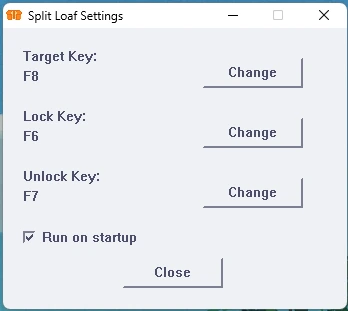
Right-click the system tray icon to access:
Settings
Rebind target, lock, and unlock keys
Enable or disable “Run on Startup”
Exit
Cleanly shuts down the application
All settings apply immediately and are written to the Windows Registry. No restart is required, and future updates preserve your configuration automatically.
Installation
Option 1: Microsoft Store (Recommended)
Open the Microsoft Store page for Split Loaf.
Download and install.
Launch the app.
Optionally enable Run on Startup from settings.
This provides automatic updates and seamless Windows integration.
Option 2: GitHub Release
Download the latest Windows executable from GitHub Releases.
Move it to a preferred location.
Run the executable.
Optionally enable Run on Startup.
No installers, no dependencies, no additional setup.
Technical Overview (For the Curious)
Internally, Split Loaf uses a low-level keyboard hook (WH_KEYBOARD_LL) to intercept key-down events before applications receive them.
Instead of sending both key-down and key-up events manually (which breaks modifier handling), Split Loaf:
Intercepts key-down events
Re-injects them directly into the target window
Allows Windows to naturally handle key-up events
This approach ensures:
Correct modifier behaviour
Efficient handling of held keys
Minimal interference with the OS
Input is sent using Windows’ native input APIs, preserving compatibility with most desktop applications.
Known Limitations
Unicode and complex multi-character input may not work perfectly in all applications.
Some software may ignore rerouted input depending on how it processes keyboard events.
Currently Windows-only.
These are architectural realities of input handling on modern operating systems, not design oversights.
Future Roadmap
Split Loaf is stable, but far from finished.
Planned improvements include:
Full Unicode and symbol input support
Optional visual lock indicators
Desktop notifications for lock and unlock events
Expanded customisation options
Cross-platform exploration, starting with Linux
Development on Split Loaf has already influenced ideas for The Bread Bin, so expect some shared innovation down the line.
Final Thoughts
Split Loaf started as a late-night experiment and evolved into a genuinely useful productivity tool. It solves a problem Windows has ignored for decades and does so with minimal overhead, no configuration files, and no bloat.
If your workflow involves multiple windows, monitors, or unconventional input habits, Split Loaf gives you back control.
Contact & Support
For bug reports, feature requests, or general questions:
Austin Welsh-Graham
All Things Toasty Software Ltd
Email: admin@toastysoftware.co.uk